

2023 Valid MS-102 Exam Updates - 2023 Study Guide
MS-102 Certification - The Ultimate Guide [Updated 2023]
NEW QUESTION # 124
HOTSPOT
You have a Microsoft 365 E5 subscription that contains the users shown in the following table.
You add the following assignment for the User Administrator role:
Scope type: Directory
Selected members: Group1
Assignment type: Active
Assignment starts: Mar 15, 2023
Assignment ends: Aug 15, 2023
You add the following assignment for the Exchange Administrator role:
Scope type: Directory
Selected members: Group2
Assignment type: Eligible
Assignment starts: Jun 15, 2023
Assignment ends: Oct 15, 2023
For each of the following statements, select Yes if the statement is true. Otherwise, select No.
NOTE: Each correct selection is worth one point.
Answer:
Explanation: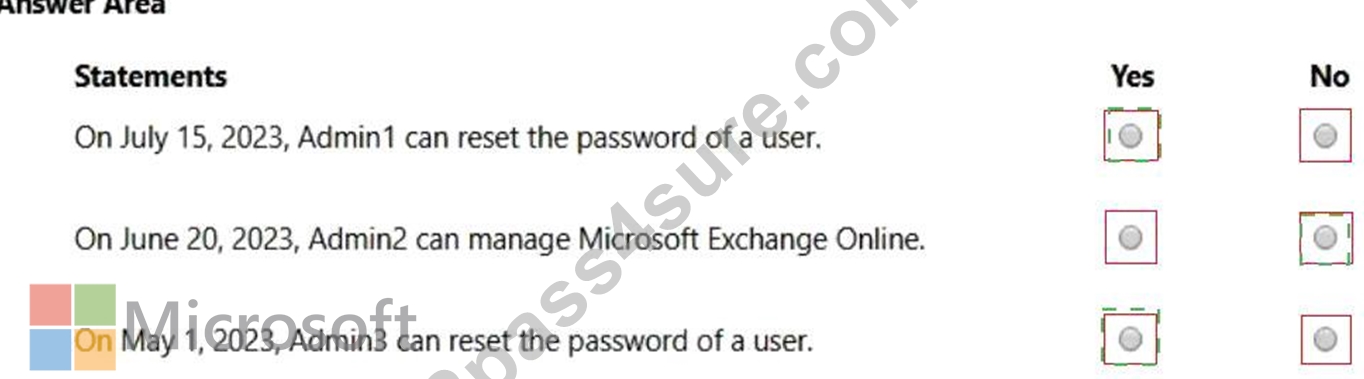
Explanation
Box 1: Yes
Admin1 is member of Group1.
The User Administrator role assignment has Group1 as a member.
The assignment type: Active
July 15, 2023 is with the assignment period.
A User Administrator can manage all aspects of users and groups, including resetting passwords for limited admins.
Box 2: No
Admin2 is member of Group2.
The Exchange Administrator role assignment has Group2 as a member.
The assignment type: Eligible
June 20, 2023 is with the assignment period.
The assignment must be approved.
Note: Eligible assignment requires member or owner to perform an activation to use the role. Activations may also require providing a multi-factor authentication (MFA), providing a business justification, or requesting approval from designated approvers.
Box 3: Yes
Admin3 is member of Gropu1 and Group2.
The User Administrator role assignment has Group1 as a member.
The assignment type: Active
May 1, 2023 is with the assignment period.
Reference:
https://learn.microsoft.com/en-us/azure/active-directory/roles/permissions-reference
https://learn.microsoft.com/en-us/azure/active-directory/privileged-identity-management/groups-assign-member-
NEW QUESTION # 125
HOTSPOT
You have a Microsoft 365 E5 subscription that contains a Microsoft SharePoint Online site named Site1 and the users shown in the following table.
The devices are configured as shown in the following table.
You have a Conditional Access policy named CAPolicy1 that has the following settings:
1.Assignments
Users or workload identities: Group1
Cloud apps or actions: Office 365 SharePoint Online
Conditions
- Filter for devices: Exclude filtered devices from the policy
- Rule syntax: device.displayName -startsWith "Device"
2.Access controls
Grant
- Grant: Block access
Session: 0 controls selected
3.Enable policy: On
For each of the following statements, select Yes if the statement is true. Otherwise, select No.
NOTE: Each correct selection is worth one point.
Answer:
Explanation:
Explanation
Box 1: No
User1 is member of Group1 and has Device1.
Device1 is not Azure AD joined.
Note: Requiring a hybrid Azure AD joined device is dependent on your devices already being hybrid Azure AD joined.
Box 2: Yes
User2 is member of Group1 and has devices Device2 and Device3.
Device2 is Azure AD joined.
Device2 is excluded from CAPolicy1 (which would block access to Site1).
Box 3: Yes
User2 is member of Group1 and has devices Device2 and Device3.
Device3 is Android and is Azure AD registered.
Device3 is excluded from CAPolicy1 (which would block access to Site1).
Note: On Windows 7, iOS, Android, macOS, and some third-party web browsers, Azure AD identifies the device using a client certificate that is provisioned when the device is registered with Azure AD. When a user first signs in through the browser the user is prompted to select the certificate. The end user must select this certificate before they can continue to use the browser.
Reference:
https://learn.microsoft.com/en-us/azure/active-directory/devices/howto-hybrid-azure-ad-join
https://learn.microsoft.com/en-us/azure/active-directory/conditional-access/howto-conditional-access-policy-com
NEW QUESTION # 126
Which role should you assign to User1?
Available Choices (select all choices that are correct)
- A. Records Management
- B. Security Administrator
- C. Security Reader
- D. Hygiene Management
Answer: C
Explanation:
Explanation
A user named User1 must be able to view all DLP reports from the Microsoft 365 admin center.
Users with the Security Reader role have global read-only access on security-related features, including all information in Microsoft 365 security center, Azure Active Directory, Identity Protection, Privileged Identity Management, as well as the ability to read Azure Active Directory sign-in reports and audit logs, and in Office
365 Security & Compliance Center.
Reference:
https://docs.microsoft.com/en-us/azure/active-directory/users-groups-roles/directory-assign-admin-roles
NEW QUESTION # 127
You have a Microsoft 365 E5 tenant that contains 500 Windows 10 devices and a Windows 10 compliance policy.
You deploy a third-party antivirus solution to the devices.
You need to ensure that the devices are marked as compliant.
Which three settings should you modify in the compliance policy? To answer, select the appropriate settings in the answer area.
NOTE: Each correct selection is worth one point.
Answer:
Explanation:
Explanation
Graphical user interface Description automatically generated
Reference:
https://docs.microsoft.com/en-us/mem/intune/protect/compliance-policy-create-windows
NEW QUESTION # 128
Your network contains an on-premises Active Directory domain named contoso.local. The domain contains five domain controllers.
Your company purchases Microsoft 365 and creates an Azure AD tenant named contoso.onmicrosoft.com.
You plan to install Azure AD Connect on a member server and implement pass-through authentication.
You need to prepare the environment for the planned implementation of pass-through authentication.
Which three actions should you perform? Each correct answer presents part of the solution.
NOTE: Each correct selection is worth one point.
- A. From a domain controller install an Authentication Agent
- B. From the Microsoft Entra admin center, confiqure an authentication method.
- C. Modify the email address attribute for each user account.
- D. From Active Director,' Domains and Trusts add a UPN suffix
- E. Modify the User logon name for each user account.
- F. From the Microsoft Entra admin center, add a custom domain name.
Answer: A,B,F
Explanation:
Explanation
Deploy Azure AD Pass-through Authentication
Step 1: Check the prerequisites
Ensure that the following prerequisites are in place.
In the Entra admin center
1. Create a cloud-only Hybrid Identity Administrator account or a Hybrid Identity administrator account on your Azure AD tenant. This way, you can manage the configuration of your tenant should your on-premises services fail or become unavailable.
(E) 2. Add one or more custom domain names to your Azure AD tenant. Your users can sign in with one of these domain names.
(A) In your on-premises environment
1. Identify a server running Windows Server 2016 or later to run Azure AD Connect. If not enabled already, enable TLS 1.2 on the server. Add the server to the same Active Directory forest as the users whose passwords you need to validate. It should be noted that installation of Pass-Through Authentication agent on Windows Server Core versions is not supported.
2. Install the latest version of Azure AD Connect on the server identified in the preceding step. If you already have Azure AD Connect running, ensure that the version is supported.
3. Identify one or more additional servers (running Windows Server 2016 or later, with TLS 1.2 enabled) where you can run standalone Authentication Agents. These additional servers are needed to ensure the high availability of requests to sign in. Add the servers to the same Active Directory forest as the users whose passwords you need to validate.
4. Etc.
(B) Step 2: Enable the feature
Enable Pass-through Authentication through Azure AD Connect.
If you're installing Azure AD Connect for the first time, choose the custom installation path. At the User sign-in page, choose Pass-through Authentication as the Sign On method. On successful completion, a Pass-through Authentication Agent is installed on the same server as Azure AD Connect. In addition, the Pass-through Authentication feature is enabled on your tenant.
Incorrect:
Not C: From Active Directory Domains and Trusts, add a UPN suffix
Not D. Modify the email address attribute for each user account.
Not F. Modify the User logon name for each user account.
Reference:
https://learn.microsoft.com/en-us/azure/active-directory/hybrid/connect/how-to-connect-pta-quick-start
NEW QUESTION # 129
You need to meet the technical requirement for the SharePoint administrator. What should you do? To answer, select the appropriate options in the answer area. NOTE: Each correct selection is worth one point.
Answer:
Explanation:
Explanation
References:
https://docs.microsoft.com/en-us/office365/securitycompliance/search-the-audit-log-in-security-and-compliance#
NEW QUESTION # 130
HOTSPOT
You have a new Microsoft 365 E5 tenant.
Enable Security defaults is set to Yes.
A user signs in to the tenant for the first time.
Which multi-factor authentication (MFA) method can the user use, and how many days does the user have to register for MFA? To answer, select the appropriate options in the answer area.
NOTE: Each correct selection is worth one point.
Answer:
Explanation:
Explanation
Box 1: Notification to Microsoft Authenticator app
Do users have 14 days to register for Azure AD Multi-Factor Authentication?
Users have 14 days to register for MFA with the Microsoft Authenticator app from their smart phones, which begins from the first time they sign in after security defaults has been enabled. After 14 days have passed, the user won't be able to sign in until MFA registration is completed.
Box 2: 14
Azure AD Identity Protection will prompt your users to register the next time they sign in interactively and they'll have 14 days to complete registration. During this 14-day period, they can bypass registration if MFA isn't required as a condition, but at the end of the period they'll be required to register before they can complete the sign-in process.
Reference:
https://learn.microsoft.com/en-us/microsoft-365/solutions/empower-people-to-work-remotely-secure-sign-in
https://learn.microsoft.com/en-us/azure/active-directory/identity-protection/howto-identity-protection-configure-
NEW QUESTION # 131
You have a Microsoft 365 E5 tenant.
You need to create a policy that will trigger an alert when unusual Microsoft Office 365 usage patterns are detected.
What should you use to create the policy?
- A. the Microsoft 365 admin center
- B. the Microsoft Apps admin center
- C. the Microsoft Purview compliance portal
- D. the Microsoft Defender for Cloud Apps portal
Answer: D
NEW QUESTION # 132
You have a Microsoft 365 E5 tenant.
The Microsoft Secure Score for the tenant is shown in the following exhibit.
You plan to enable Security defaults for Azure Active Directory (Azure AD).
Which three improvement actions will this affect?
- A. Require MFA for administrative roles.
- B. Ensure all users can complete multi-factor authentication for secure access
- C. Use limited administrative roles
- D. Enable self-service password reset
- E. Enable policy to block legacy authentication
Answer: A,B,E
Explanation:
Reference:
https://docs.microsoft.com/en-us/azure/active-directory/fundamentals/concept-fundamentals-security-defaults
NEW QUESTION # 133
You have a Microsoft 365 E5 subscription.
Users have the devices shown in the following table.
On which devices can you manage apps by using app configuration policies in Microsoft Endpoint Manager?
- A. Device1, Device2, Device3, and Device6
- B. Device2, Device3, and Device5
- C. Device1, Device4, and Device6
- D. Device1, Device2, Device4, and Device5
Answer: A
Explanation:
Explanation
You can create and use app configuration policies to provide configuration settings for both iOS/iPadOS or Android apps on devices that are and are not enrolled in Microsoft Endpoint Manager.
Reference:
https://docs.microsoft.com/en-us/mem/intune/apps/app-configuration-policies-overview
NEW QUESTION # 134
Note: This question is part of a series of questions that present the same scenario. Each question in the series contains a unique solution that might meet the stated goals. Some question sets might have more than one correct solution, while others might not have a correct solution.
After you answer a question in this section, you will NOT be able to return to it. As a result, these questions will not appear in the review screen.
You have a Microsoft 365 E5 subscription.
You create an account for a new security administrator named SecAdmin1.
You need to ensure that SecAdmin1 can manage Office 365 Advanced Threat Protection (ATP) settings and policies for Microsoft Teams, SharePoint, and OneDrive.
Solution: From the Microsoft 365 admin center, you assign SecAdmin1 the SharePoint admin role.
Does this meet the goal?
- A. Yes
- B. No
Answer: B
Explanation:
Explanation
You need to assign the Security Administrator role.
Reference:
https://docs.microsoft.com/en-us/microsoft-365/security/office-365-security/office-365-atp?view=o365-worldwi
NEW QUESTION # 135
Note: This question is part of a series of questions that present the same scenario. Each question in the series contains a unique solution that might meet the stated goals. Some question sets might have more than one correct solution, while others might not have a correct solution.
After you answer a question in this section, you will NOT be able to return to it. As a result, these questions will not appear in the review screen.
Your network contains an on-premises Active Directory domain named contoso.com. The domain contains the users shown in the following table.
The domain syncs to an Azure AD tenant named contoso.com as shown in the exhibit. (Click the Exhibit tab.)
User2 fails to authenticate to Azure AD when signing in as [email protected].
You need to ensure that User2 can access the resources in Azure AD.
Solution: From the Microsoft Entra admin center, you assign User2 the Security Reader role. You instruct User2 to sign in as [email protected].
Does this meet the goal?
- A. Yes
- B. No
Answer: B
Explanation:
Explanation
This is not a permissions issue so you do not need to assign the Security Reader role.
The on-premises Active Directory domain is named contoso.com. User2 could sign on as [email protected] but you would first need to change the UPN of User2 to [email protected].
NEW QUESTION # 136
Your company has offices in five cities.
The company has a Microsoft 365 tenant.
Each office is managed by a local administrator.
You plan to deploy Microsoft Intune.
You need to recommend a solution to manage resources in intune that meets the following requirements:
Local administrators must be able to manage only the resources in their respective office.
Local administrators must be prevented from managing resources in other offices.
Administrative effort must be minimized.
What should you include in the recommendation?
- A. configuration profiles
- B. conditional access policies
- C. scope tags
- D. device categories
Answer: C
Explanation:
Reference:
https://docs.microsoft.com/en-us/mem/intune/fundamentals/scope-tags
NEW QUESTION # 137
You have a Microsoft 365 E5 tenant that contains the devices shown in the following table.
The devices are managed by using Microsoft Intune.
You plan to use a configuration profile to assign the Delivery Optimization settings.
Which devices will support the settings?
- A. Device1, Device2, Device3, and Device4
- B. Device1 only
- C. Device1, Device3, and Device4
- D. Device1 and Device4
Answer: B
NEW QUESTION # 138
You have a new Microsoft 365 E5 tenant.
You need to enable an alert policy that will be triggered when an elevation of Microsoft Exchange Online administrative privileges is detected.
What should you do first?
- A. Create a communication compliance policy.
- B. Enable Microsoft 365 usage analytics.
- C. Enable auditing.
- D. Create an Insider risk management policy.
Answer: C
Explanation:
Explanation
Microsoft Purview auditing solutions provide an integrated solution to help organizations effectively respond to security events, forensic investigations, internal investigations, and compliance obligations. Thousands of user and admin operations performed in dozens of Microsoft 365 services and solutions are captured, recorded, and retained in your organization's unified audit log. Audit records for these events are searchable by security ops, IT admins, insider risk teams, and compliance and legal investigators in your organization. This capability provides visibility into the activities performed across your Microsoft 365 organization.
Note: Permissions alert policies
Example: Elevation of Exchange admin privilege
Generates an alert when someone is assigned administrative permissions in your Exchange Online organization. For example, when a user is added to the Organization Management role group in Exchange Online.
Reference:
https://learn.microsoft.com/en-us/microsoft-365/compliance/audit-solutions-overview
https://learn.microsoft.com/en-us/microsoft-365/compliance/alert-policies
NEW QUESTION # 139
You have a Microsoft 365 E5 subscription that contains the users shown in the following table.
You ate implementing Microsoft Defender for Endpoint
You need to enable role-based access control (RBAQ to restrict access to the Microsoft 365 Defender portal.
Which users can enable RBAC, and winch users will no longer have access to the Microsoft 365 Defender portal after RBAC is enabled? To answer, select the appropriate options in the answer area.
NOTE Each correct selection is worth one point.
Answer:
Explanation:
Explanation
NEW QUESTION # 140
......
MS-102 Practice Exam and Study Guides - Verified By 2Pass4sure: https://www.2pass4sure.com/Microsoft-365-Certified/MS-102-actual-exam-braindumps.html
2023 Updated Verified Pass MS-102 Study Guides & Best Courses: https://drive.google.com/open?id=1wszT_WUeUN3JwfbuzQGVsqn4_x8dMP2R