

[Jan 14, 2024] Valid MS-100 Test Answers & Microsoft MS-100 Exam PDF
Realistic MS-100 Exam Dumps with Accurate & Updated Questions
NEW QUESTION # 90
Note: This question is part of a series of questions that present the same scenario. Each question in the series contains a unique solution that might meet the stated goals. Some question sets might have more than one correct solution, while others might not have a correct solution.
After you answer a question in this section, you will NOT be able to return to it. As a result, these questions will not appear in the review screen.
Your network contains an Active Directory forest.
You deploy Microsoft 365.
You plan to implement directory synchronization.
You need to recommend a security solution for the synchronized identities. The solution must meet the following requirements:
Users must be able to authenticate successfully to Microsoft 365 services if Active Directory becomes unavailable.
Users passwords must be 10 characters or more.
Solution: Implement password hash synchronization and modify the password settings from the Default Domain Policy in Active Directory.
Does this meet the goal?
- A. Yes
- B. No
Answer: A
Explanation:
This solution meets the requirements:
Users must be able to authenticate successfully to Microsoft 365 services if Active Directory becomes unavailable. (this is because the authentication is performed by Azure Active Directory).
Users passwords must be 10 characters or more. (the Default Domain Policy in the on-premise Active Directory can be configured to require the password length) Reference:
https://docs.microsoft.com/en-us/azure/active-directory/hybrid/how-to-connect-password-hash-synchronization
NEW QUESTION # 91
You have a Microsoft 365 subscription.
You have a group named Support. Users in the Support group frequently send email messages to external users.
The manager of the Support group wants to randomly review messages that contain attachments.
You need to provide the manager with the ability to review messages that contain attachments sent from the Support group users to external users. The manager must have access to only 10 percent of the messages.
What should you do? To answer, select the appropriate options in the answer area.
NOTE: Each correct selection is worth one point.
Answer:
Explanation: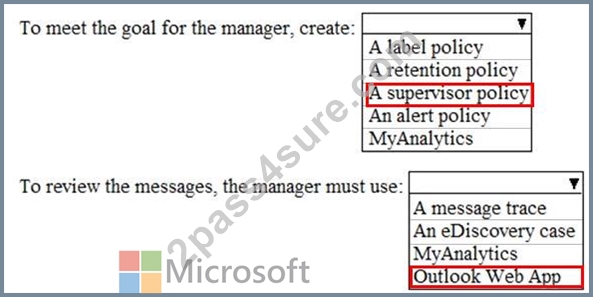
Reference:
https://docs.microsoft.com/en-us/office365/securitycompliance/supervision-policies
NEW QUESTION # 92
You have a Microsoft Azure Active Directory (Azure AD) tenant named contoso.com that includes a user named User1.
You enable multi-factor authentication for contoso.com and configure the following two fraud alert settings:
* Set Allow users to submit fraud alerts: On
* Automatically block users who report fraud: On
You need to instruct the users in your organization to use the fraud reporting features correctly.
What should you tell the users to do? To answer, select the appropriate options in the answer area.
NOTE: Each correct selection is worth one point.
Answer:
Explanation:
Explanation
Code to report fraud during initial greeting: When users receive a phone call to perform two-step verification, they normally press # to confirm their sign-in. To report fraud, the user enters a code before pressing #. This code is 0 by default, but you can customize it.
Block user when fraud is reported: If a user reports fraud, their account is blocked for 90 days or until an administrator unblocks their account. An administrator can review sign-ins by using the sign-in report, and take appropriate action to prevent future fraud. An administrator can then unblock the user's account.
Reference:
https://docs.microsoft.com/en-us/azure/active-directory/authentication/howto-mfa-mfasettings#fraud-alert
NEW QUESTION # 93
You need to meet the security requirements for User3. The solution must meet the technical requirements.
What should you do? To answer, select the appropriate options in the answer area.
NOTE: Each correct selection is worth one point.
Answer:
Explanation:
Explanation:
References:
https:HYPERLINK "https://docs.microsoft.com/en-us/office365/SecurityCompliance/eop/feature-permissions-in-eop"//docs.microsoft.com/en-us/office365/SecurityCompliance/eop/feature-permissions-in-eop
NEW QUESTION # 94
Your company has a Microsoft 365 subscription that has multi-factor authentication configured for all users.
Users that connect to Microsoft 365 services report that they are prompted for multi-factor authentication multiple times a day.
You need to reduce the number of times the users are prompted for multi-factor authentication on their company-owned devices. Your solution must ensure that users are still prompted for MFA.
What should you do?
- A. Enable the remember multi-factor authentication setting, and then join all client computers to Microsoft Azure Active Directory (Azure AD).
- B. Enable the multi-factor authentication trusted IPs setting, and then verify each device as a trusted device.
- C. Enable the remember multi-factor authentication setting, and then verify each device as a trusted device.
- D. Enable the multi-factor authentication trusted IPs setting, and then join all client computers to Microsoft Azure Active Directory (Azure AD).
Answer: C
Explanation:
Section: [none]
Explanation:
The remember Multi-Factor Authentication feature for devices and browsers that are trusted by the user is a free feature for all Multi-Factor Authentication users. Users can bypass subsequent verifications for a specified number of days, after they've successfully signed-in to a device by using Multi-Factor Authentication. The feature enhances usability by minimizing the number of times a user has to perform two-step verification on the same device.
Reference:
https://docs.microsoft.com/en-us/azure/active-directory/authentication/howto-mfa-mfasettings
NEW QUESTION # 95
Note: This question is part of a series of questions that present the same scenario. Each question in the series contains a unique solution that might meet the stated goals. Some question sets might have more than one correct solution, while others might not have a correct solution.
After you answer a question in this section, you will NOT be able to return to it. As a result, these questions will not appear in the review screen.
Your company plans to deploy several Microsoft Office 365 services.
You need to design an authentication strategy for the planned deployment. The solution must meet the following requirements:
* Users must be able to authenticate during business hours only.
* Authentication requests must be processed successfully if a single server fails.
* When the password for an on-premises user account expires, the new password must be enforced the next time the user signs in.
* Users who connect to Office 365 services from domain-joined devices that are connected to the internal network must be signed in automatically.
Solution: You design an authentication strategy that uses password hash synchronization and seamless SSO. The solution contains two servers that have an Authentication Agent installed.
Does this meet the goal?
- A. Yes
- B. No
Answer: B
Explanation:
Reference:
https://docs.microsoft.com/en-us/azure/security/azure-ad-choose-authn
NEW QUESTION # 96
You create the Microsoft 365 tenant.
You implement Azure AD Connect as shown in the following exhibit.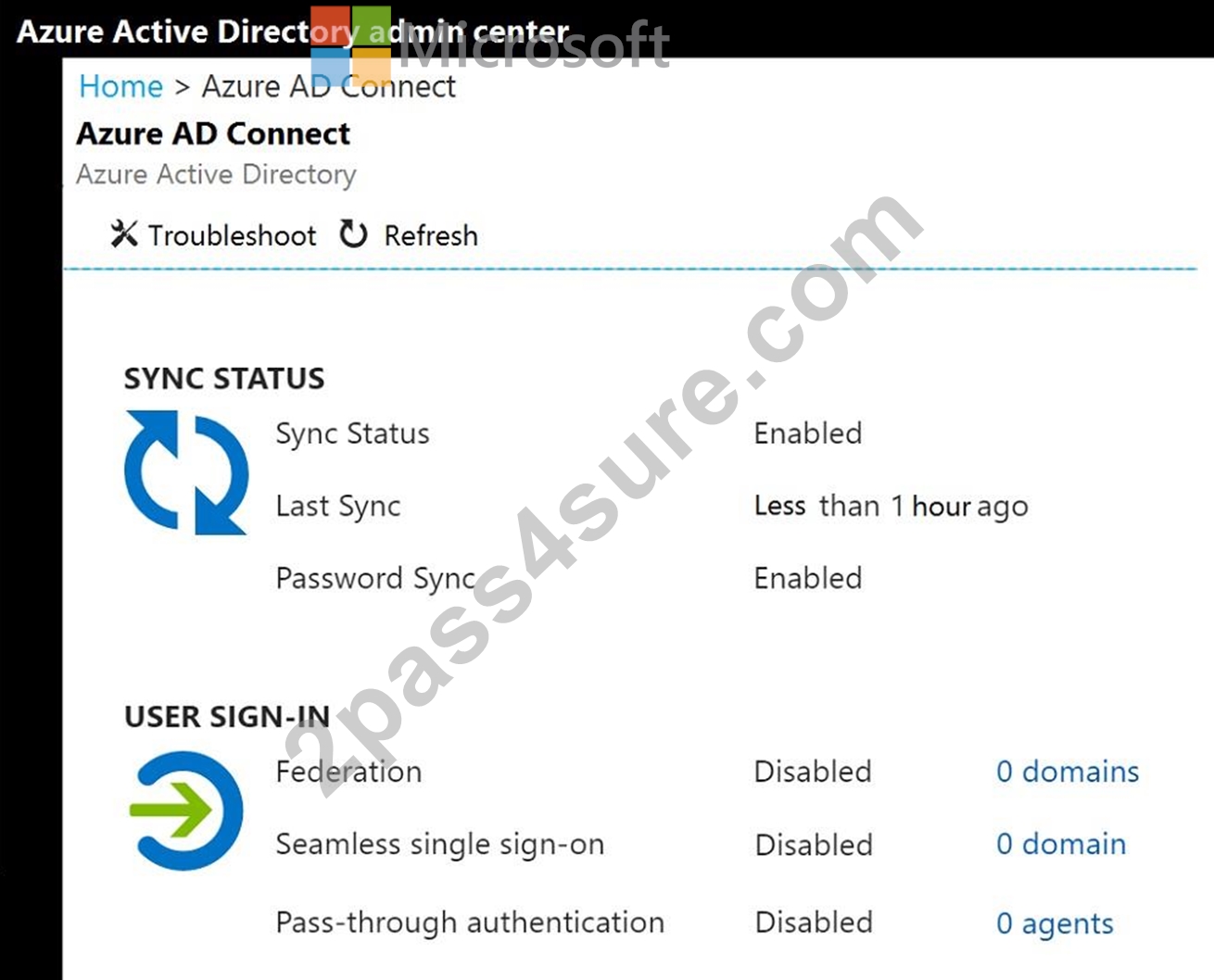
Use the drop-down menus to select the answer choice that completes each statement based on the information presented in the graphic.
NOTE: Each correct selection is worth one point.
Answer:
Explanation:
Explanation
In the exhibit, seamless single sign-on (SSO) is disabled. Therefore, as SSO is disabled in the cloud, the Sales department users can access only on-premises applications by using SSO.
In the exhibit, directory synchronization is enabled and active. This means that the on-premises Active Directory user accounts are synchronized to Azure Active Directory user accounts. If the on-premises Active Directory becomes unavailable, the users can access resources in the cloud by authenticating to Azure Active Directory. They will not be able to access resources on-premises if the on-premises Active Directory becomes unavailable as they will not be able to authenticate to the on-premises Active Directory.
NEW QUESTION # 97
You need to ensure that Admin4 can use SSPR.
Which tool should you use, and which action should you perform? To answer, select the appropriate options in the answer area.
NOTE: Each correct selection is worth one point.
Answer:
Explanation:
Explanation
Graphical user interface, text, application, chat or text message Description automatically generated
Reference:
https://docs.microsoft.com/en-us/azure/active-directory/authentication/howto-sspr-deployment
Topic 4, NEW Case Study
Case Study
Overview
This is a case study. Case studies are not timed separately. You can use as much exam time as you would like to complete each case. However, there may be additional case studies and sections on this exam. You must manage your time to ensure that you are able to complete all questions included on this exam in the time provided.
To answer the questions included in a case study, you will need to reference information that is provided in the case study. Case studies might contain exhibits and other resources that provide more information about the scenario that is described in the case study. Each question is independent of the other questions in this case study.
At the end of this case study, a review screen will appear. This screen allows you to review your answers and to make changes before you move to the next section of the exam. After you begin a new section, you cannot return to this section.
To start the case study
To display the first question in this case study, click the Next button. Use the buttons in the left pane to explore the content of the case study before you answer the question. Clicking these buttons displays information such as business requirements, existing environment, and problem statements. If the case study has an All Information tab, n...... that the information displayed is identical to the information displayed on the subsequent tabs. When you are ready to answer a question, click the Question button to ret........ to the question.
Existing Environment
Microsoft 365
Contoso identifies the following business goals:
* Utilize core functionality of apps whenever possible.
* Reduce app development costs.
* Minimize training costs for end users.
Microsoft SharePoint/Microsoft Exchange
Contoso has a Microsoft 365 subscription that uses a domain named contoso.com. Each user is assigned a Microsoft 365 Enterprise E5 licence.
Problem Statement
Contoso moves all email accounts to Microsoft 365.
Contoso migrates the SharePoint Server 2013 intranet sites of the research department to SharePoint Online.
Requirements
Business Goals
Contoso identifies the following issues:
* Users in the sales department report that prepanng quotations is time-consuming as it requires manually copying and pasting data from multiple sources.
* Users in the HR department must use multiple apps to manage the hiring process.
* The solution to claim expenses requires multiple manual steps.
Planned Changes
Contoso identifies the following business goals:
* Utilize core functionality of apps whenever possible.
* Reduce app development costs.
* Minimize training costs for end users.
Technical Requirements
Contoso plans to implement the following changes;
* Redesign the SharePoint Online sites of the research department to provide users with an expenence that is consistent with the Microsoft 365 portal. The research department has a third-party project management solution that uses the Microsoft identity platform in Azure AD.
* Create an email workflow solution for expense claims. Users will submit their expense claims and the system will email an approval request to their manager.
* Implement a bring your own device (BYOD) model that supports Windows 10, macOS, and Android devices.
* Develop a custom Microsoft 365 app named SalesApp for the sales department.
* Develop a custom Microsoft 365 app named HRApp for the HR department
Security Requirement
Contoso identifies the following technical requirements for app development:
* The expense claims solution must provide managers with claim information and the ability to manage the claim by using Microsoft Outlook. Outlook on the web, or Outlook for iOS and Android.
* HRApp must include a bot named HRBot that will answer HR questions. Users must be able to access the bot by mentioning HRBot in a Microsoft Teams channel or private chat.
* HRApp must enable users to query a third-party HR system by using a tab from within a Microsoft Teams channel.
* HRApp must include a messaging extension that enables users to search jobs by job title or job ID.
* SalesApp must be integrated with Microsoft Word and must combine images and text from multiple sources to create a quotation as a DOCX file.
* The distribution of SalesApp must be automatic and require minimal user interaction.
* Solutions for SharePoint Online and Microsoft Office must follow the current Office user interface (Ul) design.
* Development tools and solutions must support Windows and non-Windows devices.
* Development effort must be minimized.
HRApp Manifest
All solutions must support the Microsoft identity platform in Azure AD.
Intranet components must not share access tokens.
NEW QUESTION # 98
You have a Microsoft 365 subscription.
Your company purchases a new financial application named App1.
From Cloud Discovery in Microsoft Cloud App Security, you view the Discovered apps page and discover that many applications have a low score because they are missing information about domain registration and consumer popularity.
You need to prevent the missing information from affecting the score.
What should you configure from the Cloud Discover settings?
- A. Default behavior
- B. Score metrics
- C. Organization details
- D. App tags
Answer: D
Explanation:
References:
https://docs.microsoft.com/en-us/cloud-app-security/discovered-app-queries
NEW QUESTION # 99
You have a Microsoft 365 E5 subscription and a hybrid deployment of Microsoft Exchange. The deployment contains TOO users who have on-premises mailboxes and 100 users who have mailboxes in Exchange Online.
You enable Microsoft Teams and assign a Microsoft Teams license to each user.
You need to ensure that the users who have on-premises mailboxes can use Microsoft Teams. All Microsoft Teams chat data must be searchable by using Content search in the Security fit Compliance admin center.
What should you do? To answer, select the appropriate options in the answer area.
NOTE: Each correct selection is worth one point.
Answer:
Explanation:
NEW QUESTION # 100
You have a new Microsoft 365 subscription.
A user named User1 has a mailbox in Microsoft Exchange Online.
You need to log any changes to the mailbox folder permissions of User1.
Which command should you run? To answer, select the appropriate options in the answer area.
NOTE: Each correct selection is worth one point.
Answer:
Explanation:
Reference:
https://support.microsoft.com/en-us/help/4026501/office-auditing-in-office-365-for-admins
https://docs.microsoft.com/en-us/powershell/module/exchange/mailboxes/set-mailbox?view=exchange-ps
NEW QUESTION # 101
You have a Microsoft 365 Enterprise E5 subscription.
You add a cloud-based app named App1 to the Microsoft Azure Active Directory (Azure AD) enterprise applications list.
You need to ensure that two-step verification is enforced for all user accounts the next time they connect to App1.
Which three settings should you configure from the policy? To answer, select the appropriate settings in the answer area.
Answer:
Explanation:
Explanation:
References:
https://docs.microsoft.com/en-us/azure/active-directory/conditional-access/best-practices
https://techcommunity.microsoft.com/t5/Enterprise-Mobility-Security/Conditional-Access-now-in-the-new-Azure-portal/ba-p/250060
NEW QUESTION # 102
Your network contains an on-premises Active Directory domain named contoso.com that is synced to a Microsoft Azure Active Directory (Azure AD) tenant. The on-premises domain contains a server named Server1 that runs Windows Server 2016 and 200 client computers that run Windows 10.
Your company purchases a Microsoft 365 subscription.
On Server1, you create a file share named Share1. You extract the Microsoft Office Deployment Tool (ODT) to Share1.
You need to deploy Office 365 ProPlus, and the French language pack from Share1 to the Windows 10 computers.
Which three actions should you perform in sequence? To answer, move the appropriate actions from the list of actions to the answer area and arrange them in the correct order.
Answer:
Explanation:
Reference:
https://docs.microsoft.com/en-us/DeployOffice/overview-of-the-office-2016-deployment-tool
NEW QUESTION # 103
Your network contains an on-premises Active Directory domain named contoso.com that is synced to a Microsoft Azure Active Directory (Azure AD) tenant. The on-premises domain contains a server named Server1 that runs Windows Server 2016 and 200 client computers that run Windows 10.
Your company purchases a Microsoft 365 subscription.
On Server1, you create a file share named Share1. You extract the Microsoft Office Deployment Tool (ODT) to Share1.
You need to deploy Office 365 ProPlus, and the French language pack from Share1 to the Windows 10 computers.
Which three actions should you perform in sequence? To answer, move the appropriate actions from the list of actions to the answer area and arrange them in the correct order.
Answer:
Explanation:
Reference:
https://docs.microsoft.com/en-us/DeployOffice/overview-of-the-office-2016-deployment-tool
NEW QUESTION # 104
Note: This question is part of a series of questions that present the same scenario. Each question in the series contains a unique solution that might meet the stated goals. Some question sets might have more than one correct solution, while others might not have a correct solution.
After you answer a question in this section, you will NOT be able to return to it. As a result, these questions will not appear in the review screen.
Your network contains an Active Directory domain.
You deploy a Microsoft Azure Active Directory (Azure AD) tenant.
Another administrator configures the domain to synchronize to Azure AD.
You discover that 10 user accounts in an organizational unit (OU) are NOT synchronized to Azure AD. All the other user accounts synchronized successfully.
You review Azure AD Connect Health and discover that all the user account synchronizations completed successfully.
You need to ensure that the 10 user accounts are synchronized to Azure AD.
Solution: From Azure AD Connect, you modify the filtering settings.
Does this meet the goal?
- A. Yes
- B. No
Answer: A
Explanation:
Section: [none]
Explanation:
The question states that "all the user account synchronizations completed successfully". Therefore, we know that Azure AD Connect is working and configured correctly. The only thing that would prevent the 10 user accounts from being synchronized is that they are being excluded from the synchronization cycle by a filtering rule.
Reference:
https://docs.microsoft.com/en-us/azure/active-directory/hybrid/how-to-connect-sync-configure-filtering
NEW QUESTION # 105
......
MS-100 Exam Dumps - PDF Questions and Testing Engine: https://www.2pass4sure.com/Microsoft-365/MS-100-actual-exam-braindumps.html
MS-100 Dumps - The Sure Way To Pass Exam: https://drive.google.com/open?id=1cpP7CJkg5nZB70gC-y0aSVGNqW2mqIWo