

[Mar 31, 2026] Web-Development-Applications Ultimate Study Guide - 2Pass4sure
Ultimate Guide to Prepare Web-Development-Applications Certification Exam for Courses and Certificates in 2026
WGU Web-Development-Applications Exam Syllabus Topics:
| Topic | Details |
|---|---|
| Topic 1 |
|
| Topic 2 |
|
| Topic 3 |
|
| Topic 4 |
|
NEW QUESTION # 41
Which CSS property should a developer specify in the `a:hover` rule set to make the red box transparent?
- A. visibility
- B. opacity
- C. z-index
- D. filter
Answer: B
Explanation:
> "The `opacity` property in CSS defines the transparency level of an element. A value of `1` means fully visible; a value of `0` makes it completely transparent. When used in a hover state, such as `a:hover { opacity:
0; }`, it causes the element to fade out when hovered over."
>
> "Unlike `visibility: hidden`, which hides the element but retains its space in the layout, `opacity` allows for smooth visual transitions in transparency." References:
* MDN Web Docs: opacity
* CSS Visual Effects Module Level 1
---
NEW QUESTION # 42
Which structure tag should a developer use to place contact information on a web page?
- A. <footer>
- B. <Aside>
- C. <Main>
- D. <Nav>
Answer: A
Explanation:
The<footer>tag is used to define a footer for a document or a section. A footer typically contains information about the author of the document, contact information, copyright details, and links to terms of use, privacy policy, etc. It is a semantic element in HTML5, which means it clearly describes its meaning to both the browser and the developer.
* Purpose of<footer>: The<footer>element represents a footer for its nearest sectioning content or sectioning root element. It typically contains information like:
* Contact information
* Copyright information
* Links to related documents
* Information about the author
* Usage Example:
<footer>
<p>Contact us at: [email protected]</p>
<p>© 2024 Example Company</p>
</footer>
In this example, the<footer>tag encloses contact information and copyright details.
* Semantic Importance: Using semantic elements like<footer>enhances the accessibility of the document and provides better context for search engines and other user devices.
:
MDN Web Docs on<footer>
W3C HTML5 Specification on<footer>
NEW QUESTION # 43
What is the term for a JavaScript function that is defined as part of an object?
- A. Event
- B. Value
- C. Method
- D. Property
Answer: C
Explanation:
> "A method is a function property of an object. In JavaScript, when a function is assigned as a property of an object, it is called a method of that object."
>
> Example:
```javascript
const person = {
greet: function() {
return "Hello!";
}
};
```
> In the above, `greet` is a method of the `person` object.
References:
* MDN Web Docs: Working with Objects - Methods
* JavaScript Reference: Functions in objects
---
NEW QUESTION # 44
Which tag is required when importing the jQuery library?
- A. Script
- B. meta
- C. Body
- D. Section
Answer: A
Explanation:
The<script>tag is required when importing the jQuery library into an HTML document.
* Including jQuery:
* Purpose: The<script>tag is used to embed or reference executable code (JavaScript).
* Example:
<script src="https://code.jquery.com/jquery-3.6.0.min.js"></script>
* Explanation:
* The<script>tag should be placed in the<head>or at the end of the<body>to ensure that the library is loaded before the scripts that depend on it.
:
jQuery Getting Started
MDN Web Docs -<script>
NEW QUESTION # 45
Which language should a developer use to create a border with rounded corners on a web page using in-line markup?
- A. HTML5
- B. CSS3
- C. Java
- D. XML
Answer: B
Explanation:
Rounded corners on HTML elements are styled using CSS3 properties. Specifically, the border-radius property introduced in CSS3 allows developers to apply curved borders to elements.
"CSS3 introduced the border-radius property, which allows web developers to create rounded corners without the need for images or complex markup."
"The syntax can be applied inline, such as:
<div style="border: 1px solid black; border-radius: 10px;">Content</div>" References:
CSS3 Official Specification - W3C
HTML & CSS Developer Guides - MDN
NEW QUESTION # 46
Which method allows the end user to enter text as an answer to a question as the page loads?
- A. alert
- B. Prompt
- C. Confirm
- D. Write
Answer: B
Explanation:
Thepromptmethod in JavaScript displays a dialog box that prompts the user for input, allowing the end user to enter text as an answer to a question when the page loads.
* promptMethod: Thepromptmethod displays a dialog box with an optional message prompting the user to input some text. It returns the text entered by the user ornullif the user cancels the dialog.
* Usage Example:
let userInput = prompt("Please enter your name:", "Harry Potter");
console.log(userInput);
In this example, a prompt dialog asks the user to enter their name, and the entered text is logged to the console.
:
MDN Web Docs onprompt
W3C HTML Specification on Dialogs
NEW QUESTION # 47
Given the following HTML code:
And given the following CSS selector:
Which elements will the CSS be applied to?
- A. Any anchors (a. element) preceded by unordered lists (ul element)
All anchors (a. dement) and elements inside unordered lists ful element) - B. Any anchors (a element) followed by unordered lists (1:1 element)
- C. All anchors (a element) and elements preceded by an unordered list (ul element)
Answer: B
Explanation:
Given the CSS selectora, ul, it targets all anchor (<a>) elements and all unordered list (<ul>) elements independently. This means the CSS rule will be applied to each<a>and<ul>element in the HTML document.
* CSS Selector Analysis:
* a: This part of the selector targets all<a>elements in the document.
* ,: The comma is a selector separator, meaning that each part of the selector list is applied independently.
* ul: This part of the selector targets all<ul>elements in the document.
* Example:
* Given HTML:
<p>
<a
href="http://example.com/link0"
>Link 0</a>
<a
href="http://example.com/link1"
>Link 1</a>
</p>
<ul>
<li>Hello</li>
</ul>
<p>
<a
href="http://example.com/link2"
>Link 2</a>
<a href="https://example.com/link3">Link 3</a>
</p>
<b>Sample</b>
* Given CSS:
a, ul {
color: red;
}
* Affected Elements: All<a>and<ul>elements will have the color set to red.
:
MDN Web Docs - Comma combinator
W3C CSS Selectors Level 3
NEW QUESTION # 48
Given the following CSS:
What is being configured?
- A. Processing on a server
- B. Processing in the browser
- C. Rendering to the canvas
Answer: B
Explanation:
The given CSS configures properties that control the processing of animations directly in the browser.
* CSS Animations: CSS animations are processed by the browser's rendering engine. The animations defined by CSS are handled client-side and do not require server-side processing.
* Key Properties:
NEW QUESTION # 49
Which code segment creates a slider field that accepts a numeric value ranging from 1 through 10?
- A.

- B.

- C.

- D.

Answer: D
Explanation:
To create a slider field that accepts a numeric value ranging from 1 through 10, the input element with type=" range" should be used. The min and max attributes define the range of acceptable values.
* HTML Input Type range:
* Purpose: The range type is used for input fields that should contain a value from a specified range.
* Attributes:
* type="range": Specifies that the input field should be a slider.
* min="1": Sets the minimum acceptable value.
* max="10": Sets the maximum acceptable value.
* Example:
* Given the HTML:
<input type="range" name="sat-level" min="1" max="10">
* Options Analysis:
* Option A:
<input type="number" name="sat-level" max="10">
* This creates a numeric input field, not a slider.
* Option B:
<input type="range" name="sat-level" min="1" max="10">
* This is the correct option that creates a slider field with the specified range.
* Option C:
<input type="number" name="sat-level" min="1" max="10">
* This creates a numeric input field, not a slider.
* Option D:
<input type="range" name="sat-level" max="10">
* This creates a slider but lacks the min attribute, so it doesn't fully meet the requirement.
* References:
* MDN Web Docs - <input type="range">
* W3Schools - HTML Input Range
By using the correct attributes, the slider field will allow users to select a value between 1 and 10.
NEW QUESTION # 50
Which 3D transform affects the distance between the z-plane and the user?
- A.

- B.

- C.

- D.

Answer: D
Explanation:
Theperspective(n)method in CSS is used to affect the distance between the z-plane and the user, effectively changing the perspective depth of a 3D transformed element.
* perspective(n)Method: Theperspectivefunction defines how far the element is from the user. It affects the appearance of the 3D transformed element, giving it a sense of depth.
* Usage Example:
container {
perspective: 1000px;
}
In this example, the perspective is set to 1000 pixels, which defines the distance between the z-plane and the user.
* Properties:
* n: This represents the perspective distance. The lower the value, the more pronounced the perspective effect.
:
MDN Web Docs onperspective
W3C CSS Transforms Module Level 1
NEW QUESTION # 51
Which HTML segment should a developer use to enable the Offline AppCache application interface (API)?
- A.

- B.

- C.

- D.

Answer: C
Explanation:
The correct HTML segment to enable the Offline AppCache application interface (API) is by specifying the manifest attribute in the <html> tag.
* AppCache Manifest: The manifest attribute in the <html> tag is used to specify the URL of the AppCach
NEW QUESTION # 52
A web page has the following CSS code:
Which selector should a developer use to invoke the CSS?
- A. id
- B. class
- C. Style
- D. Attribute
Answer: A
Explanation:
To invoke the CSS provided, an ID selector is used. In CSS, the ID selector is used to style the element with the specific id attribute.
* CSS ID Selector: The syntax for the ID selector is #id, where id is the id attribute value of the HTML element.
* Usage Example:
#black {
color: black;
}
This CSS rule will apply the color: black; style to the element with id="black".
* Example in HTML:
<div id="black">This text will be black.</div>
References:
* MDN Web Docs on ID Selectors
* W3C CSS Specification on Selectors
NEW QUESTION # 53
Which of the following statements is true about CSS properties that define sizes or positions with two values?
- A. It accepts Hex values only
- B. It requires a minimum of one value to apply
- C. It requires a minimum of two values to apply.
- D. It accepts pixel values only.
Answer: C
Explanation:
This question seems to be about a property or method that requires two values. Without additional context, the most common scenario that fits this description is CSS properties that define sizes or positions with two values. Examples includebackground-position,margin,padding, etc., where both horizontal and vertical values are needed.
:
MDN Web Docs on Background Position
W3C CSS Backgrounds and Borders Module Level 3
NEW QUESTION # 54
Given the following HTML statement:
And the following style: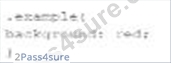
Which line of the changes the background color of the <div> tag when the width is between 600 pixels and
900 pixels or more than 1, 100 pixels?
- A.

- B.

- C.

- D.

Answer: A
Explanation:
The given HTML and CSS statements define a class named "example" and use media queries to change the background color of the <div> element based on the screen width. The correct CSS media query to change the background color of the <div> tag when the width is between 600 pixels and 900 pixels or more than 1100 pixels is:Copy code
@media screen and (max-width: 900px) and (min-width: 600px), (min-width: 1100px) { div.example { background: yellow;
}
}
* Understanding Media Queries:
* @media screen: Applies the styles only for screens.
* (max-width: 900px) and (min-width: 600px): Targets screen widths between 600 and 900 pixels.
* , (comma): Acts as an "or" operator in media queries.
* (min-width: 1100px): Targets screen widths greater than or equal to 1100 pixels.
* Option C Explanation:
* This option uses the correct media query syntax to apply the background color change when the screen width is between 600 and 900 pixels or when it is 1100 pixels or more.
References:
* MDN Web Docs on Media Queries
* W3C CSS Media Queries Level 4
The correct CSS media query based on the provided options is:
@media screen and (max-width: 900px) and (min-width: 600px), (min-width: 1100px) { div.example { background: yellow;
}
}
References for Media Queries:
* MDN Web Docs on Using Media Queries
* W3C CSS Media Queries Module Level 4
NEW QUESTION # 55
Given the following code:
What does the console display as output?
- A. 0
- B. 1
- C. 2
Answer: B
Explanation:
Given the code segment:
var a = "8";
var b = "6";
var c = a + b;
console.log(c);
This code concatenates two strings.
* Explanation:
* var a = "8";: Variableais assigned the string"8".
* var b = "6";: Variablebis assigned the string"6".
* var c = a + b;: The+operator concatenates the two strings, resulting in"86".
* console.log(c);: Outputs the value ofcto the console.
* Output:
* The console displays"86"because it concatenates the two string values.
:
MDN Web Docs - String
W3Schools - JavaScript String
NEW QUESTION # 56
......
Courses and Certificates Fundamentals-Web-Development-Applications Exam-Practice-Dumps: https://www.2pass4sure.com/Courses-and-Certificates/Web-Development-Applications-actual-exam-braindumps.html
Use Real Web-Development-Applications Dumps - WGU Correct Answers: https://drive.google.com/open?id=1aQrXfFX6ObEzhYDlnx9S3NgqAGLaUraB